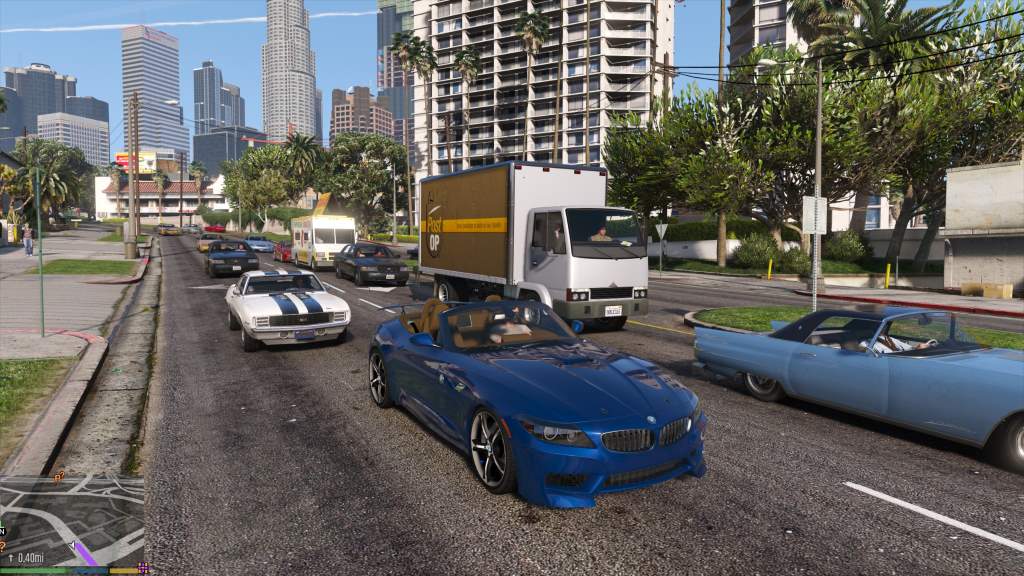
How to Install GTA 5 Realism Overhaul Mod
Picture this. You cruise through Los Santos at dusk. Streetlights pierce thick rain. Police sirens wail from afar, not instantly on you. Gangs clash in hoods under neon glows. This feels real, not arcade chaos. GTA 5 Realism Overhaul Mod delivers that thrill. Rockstar Games reports over 200 million copies sold worldwide. Meanwhile, GTA5-Mods.com sees millions of downloads yearly for enhancements like this one. Dive in. You will turn your game into a living city fast.
What is GTA 5 Realism Overhaul Mod?
GTA 5 Realism Overhaul Mod revamps Grand Theft Auto V. It tweaks graphics for sharper contrasts and darker nights. Vehicles handle with real weight. Traffic shifts by time of day.
Moreover, police act smart. They patrol zones and use tactics like PIT maneuvers. Gangs own streets at night with specific weapons. Pedestrians pack sidewalks and carry tasers sometimes. Rain thickens. Sunlight blinds. Waves crash harder.
This mod packs files into update.rpf. You replace game data directly. No scripts needed here. However, it pairs well with others. Version 1.81 dropped in May 2025. Thousands grabbed it since launch.
Users love the immersion. One tester said chases feel tense now. Another noted rural areas turn eerie after dark. You get that too. Simply follow steps ahead.

Why Choose This Realism Mod Pack?
Standard GTA V shines bright. Yet it lacks grit. Cars slide too easy. Cops spawn everywhere. Nights stay lit. This overhaul fixes all that.
First, visuals pop. Reflections gleam on wet roads. Heat haze shimmers midday. Fog lifts for clear views. Secondly, AI evolves. Rush hour clogs highways. Nights quiet down with parked rides. Taxis swarm Vinewood after dark.
Additionally, combat hurts right. Melee tires you out. Bullets drop foes naturally. Gangs feud with uzis or machetes. Police escalate smart from officers to SWAT. You plan escapes better.
Finally, it stays light. Files total under 2MB. Your rig runs smooth. Pair it with graphics packs for next level. Gamers report 60 FPS easy on mid specs.
System Requirements for GTA 5 Realism Overhaul
Your PC handles base GTA V fine. This mod adds no load. Stick to Rockstar minimums. However, tweak for best results.
- OS: Windows 10 or 11 (64-bit)
- Processor: Intel Core i5-3470 or AMD FX-8350
- RAM: 8 GB minimum, 16 GB recommended
- Graphics: NVIDIA GTX 660 2GB or AMD HD7870 2GB
- Storage: 110 GB space
- DirectX: Version 11
Run GTA V Enhanced edition if possible. It supports mods better. Test frame rates first. Tools like MSI Afterburner help monitor.
Essential Tools for Installation
OpenIV leads the pack. It edits game archives safely. Download latest from official site. Version 4.1 or newer works best in 2025.
Extract zip. Run as admin. Install .NET Framework 4.8 if missing. Create mods folder later. That keeps originals safe.
Script Hook V waits optional. This mod skips it. Yet grab for future scripts. Dev-c.com hosts newest. Copy dlla to GTA root.
ASI Loader comes bundled. Place in game folder. Now you set.
Backup Your GTA V Files First
Backups save headaches. Always copy update.rpf. Find it in GTA V main folder under update.
Right-click. Copy to desktop. Name it update_backup.rpf. Do same for mods folder if exists. Crashes happen. Restore quick.
Additionally, snapshot whole GTA directory. Tools like 7-Zip zip it up. Store on external drive. You thank yourself later.
Where to Download GTA 5 Realism Overhaul Mod
Head to GTA5-Mods.com. Search Grand Theft Auto 5.5. Click version 1.81. Hit download. File hits 1.25 MB.
Scan with antivirus. Unzip to clean folder. Avoid sketch sites. Official hosts clean files. Over 50,000 total downloads prove trust.
Patreon or Nexus mirror sometimes. Stick to main. Updates rare now. Author quit due to Rockstar changes.
Step-by-Step Installation Guide
Ready? Launch OpenIV. Log in if needed. Point to GTA V directory. Enable mods folder. Edit button activates it.
Step 1: Set Up Mods Folder
Click GTA V. Hit Edit Mode. Check mods folder box. OpenIV clones files. update.rpf appears in mods/update.
This protects originals. Changes stay separate. Launch game tests mods only.
Step 2: Open the Mod Archive
Unzip downloaded file. See folders like common, dlcpacks. Drag to OpenIV window.
Target mods/update/update.rpf. Right-click. Replace contents. Confirm all.
Handling.meta goes to x64/data. Popgroups.ymt to common/data. Relationships.dat too. OpenIV guides paths.
Step 3: Handle Specific Files
Key files include:
- handling.meta: Realistic car physics.
- popcycle.dat: Traffic density by hour.
- pedgroups.ymt: Ped variety.
- dispatch.meta: Police response.
- ambient_ped.ymt: Gang behaviors.
OpenIV streams them in. Watch progress bar. Errors? Check paths.
Step 4: Close and Test
Exit OpenIV. Launch GTA5.exe from root. Load story mode. Drive around.
Night falls darker. Traffic thins. Cops delay. Success!
Took 10 minutes? Perfect. First time longer. Practice builds speed.
Related:
7 Must-Play Upcoming Action Games for PC and Console in 2025
15 Best Open World Action-Adventure Games You Must Play in 2025
Verify Your Installation Works
Spawn vehicle. Accelerate. Feels heavy now. Headlights blind in rain.
Get wanted level two. Hide 30 seconds. Cops struggle finding you.
Visit South Central night. Gangs shoot up. Peds scatter. All signs point yes.
Use trainer optional. Menyoo spawns scenarios. Confirm changes.
Common Troubleshooting and Fixes
Crashes on load? Restore backup. Delete mods/update.rpf. Reinstall.
No cops? Check dispatch.meta replaced. Gameconfig.xml conflicts. Use 2025 version from GTA5-Mods.
LS Customs doors stuck? Mod overrides. Remove handling lines or use alternative.
ERR_GFX_D3D? Drop to DX10 in commandline.txt. Add -DX10.
Black screen nights? Tonemapping tweak. Version 1.60 fixed similar.
Comments show fixes work. Update OpenIV always. Clear cache too.
Complementary Mods for Ultimate Realism
Boost further. Add these after.
- NaturalVision Evolved: Graphics godsend. Install post overhaul.
- Realism Dispatch Enhanced: Police variety.
- Manual Transmission: Clutch shifts.
- CGE Dynamic HUD: Clean screens.
- GTA V ReSized: Performance lift.
Order matters. Overhaul first. Others overwrite safe. Test one by one.
Users stack 50+ mods stable. Your rig decides limit.
Performance Tips and Optimization
Drop shadows medium. Vegetation low if FPS dips. Mod adds little overhead.
Use ENB Series optional. Realism Beyond pairs great. Adjust presets.
Monitor with RivaTuner. Aim 60 FPS. Rural areas tax GPU less now.
Clean install helps. Fresh GTA V skips bloat. You fly smooth.
Conclusion
GTA 5 Realism Overhaul Mod changes everything. Sharper looks. Smart AI. Tense drives. You followed steps. Backed up. Installed clean.
Game transforms. Los Santos breathes. Share screenshots. Try stacks next.
Install now. Fire up GTA V. Feel the difference today.
FAQs
What Files Does GTA 5 Realism Overhaul Replace?
It swaps handling.meta, popcycle.dat, dispatch.meta, and more in update.rpf. OpenIV handles streams easy.
Do I Need Script Hook V for This Mod?
No. Pure data edits. Grab for scripts later though.
Can I Use This with GTA Online?
Stick to story mode. Online bans mods. Risk your account.
How Do I Uninstall the Mod?
Delete mods/update.rpf. Restore backup. Game reverts instant.
Is GTA 5 Realism Overhaul Compatible with Latest Patches?
Yes, up to 2025. Downgrade optional for extras. Check changelog.
References








Post Comment